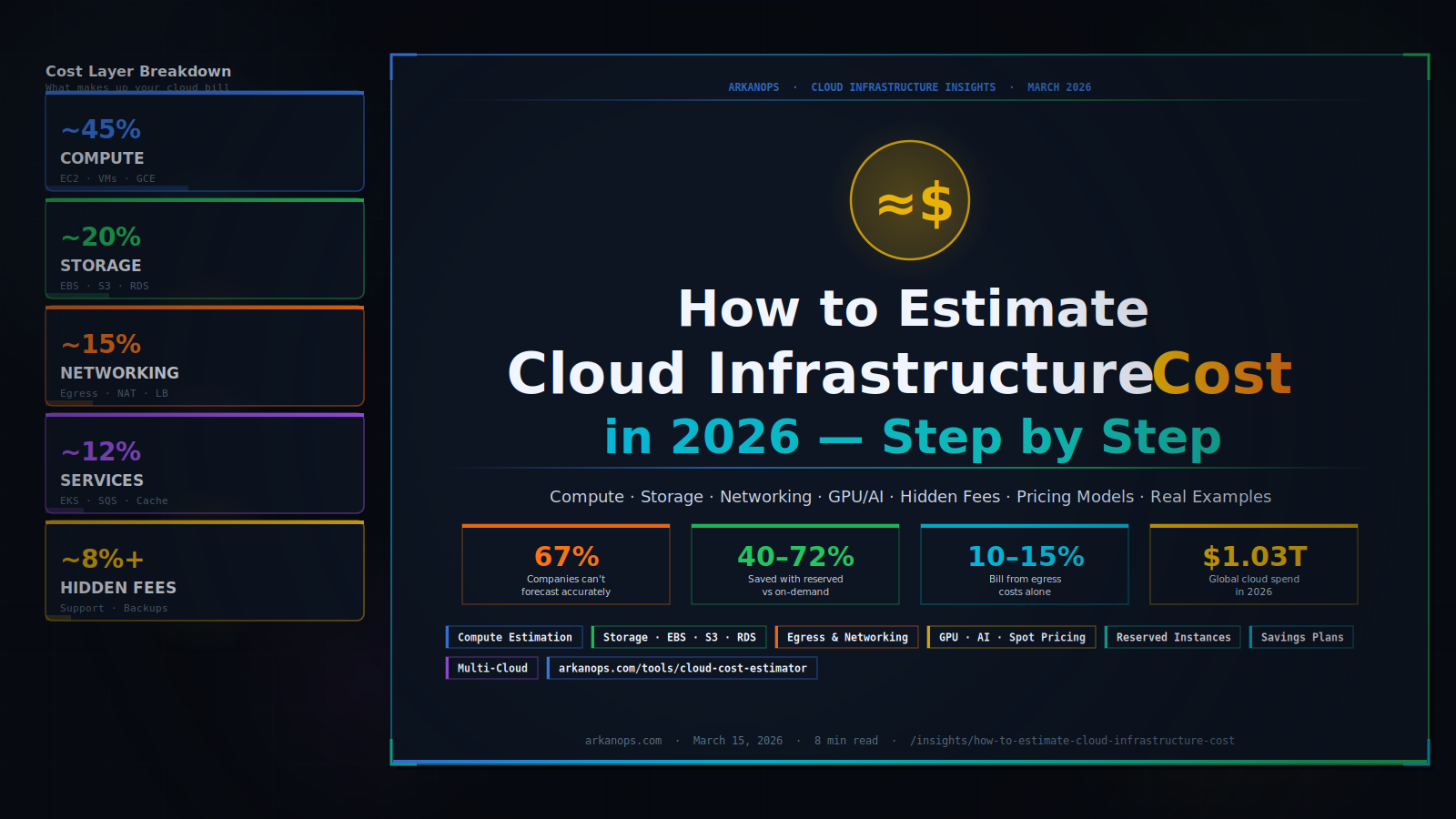
How to Estimate Cloud Infrastructure Cost in 2026
You are about to build something in the cloud — or you are already running something, and the bill keeps surprising you. Either way, you need a number you can trust. This guide shows you exactly how to estimate cloud infrastructure costs, layer by layer, without guesswork. Cloud infrastructure cost breaks into four main layers […]
You are about to build something in the cloud — or you are already running something, and the bill keeps surprising you.
Either way, you need a number you can trust. This guide shows you exactly how to estimate cloud infrastructure costs, layer by layer, without guesswork.
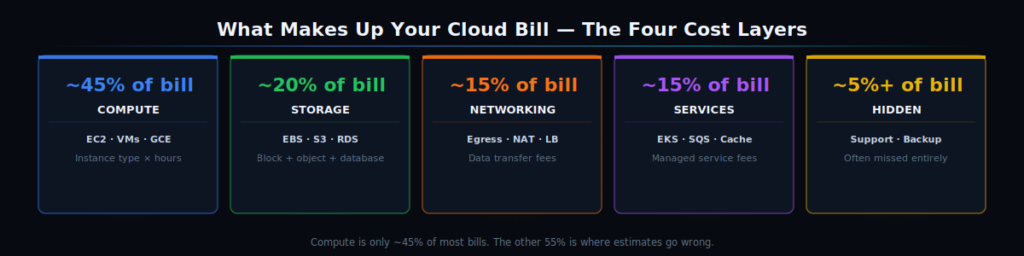
Cloud infrastructure cost breaks into four main layers — compute, storage, networking, and managed services — plus hidden fees most teams miss until the bill arrives.
67% of companies still struggle to accurately forecast their cloud costs — even after years of running in the cloud. Bills arrive with line items nobody expected. Projects spin up resources that nobody turns off. A single misconfigured workload burns thousands of dollars before anyone notices.
The fix is not complicated. You estimate cloud costs the same way you estimate anything else in engineering: break it into components, price each one, add them up, and add a buffer for the surprises.
This guide walks you through every component — and at each step, you can use the Arkanops Cloud Cost Estimator to plug in your numbers and get a real figure instantly.
🧮 Try the Arkanops Cloud Cost Estimator
Skip the spreadsheet. Enter your workload details and get an accurate monthly cost estimate across AWS, Azure, and GCP in seconds.
Why Most Cloud Cost Estimates Are Wrong
Before you build your estimate, it helps to understand why estimates usually go wrong. There are three patterns we see again and again.
Pattern 1 — Estimating only compute. Teams price the EC2 instance or the Azure VM and call it done. They forget storage, data transfer, managed services, monitoring, and support. Compute is typically only 40–50% of a real cloud bill.
Pattern 2 — Using on-demand rates for everything. On-demand pricing is the most expensive way to run steady workloads. Reserved Instances and Savings Plans cut costs by 40–72% for predictable usage. An estimate that uses all on-demand rates can be double the actual optimised cost.
Pattern 3 — Ignoring data transfer fees. Moving data between regions, between services, or out to the internet adds up faster than most teams expect. Egress costs can add 10–15% to a cloud bill and never appear in the initial estimate.
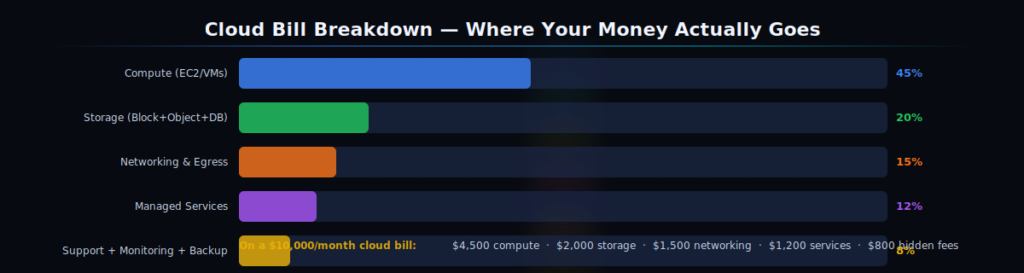
Compute is typically 40–50% of a cloud bill. The other half comes from storage, data transfer, managed services, and fees teams frequently miss.
Step-by-Step: How to Estimate Cloud Infrastructure Cost
Use this four-layer framework. Work through each layer, note the cost, then total them up. The Arkanops Cloud Cost Estimator structures this same framework for you — so you can fill in your numbers and get results immediately rather than building a spreadsheet from scratch.
Step 1 — Estimate Your Compute Cost
Compute is your servers — EC2 on AWS, Virtual Machines on Azure, Compute Engine on GCP. To price compute, you need three things: instance type, hours per month, and pricing model.
A month has approximately 730 hours. A server running 24/7 all month = 730 hours. A dev server you run only during working hours (8 hours × 22 days) = 176 hours. That scheduling difference alone cuts your compute cost by 76%.
| Instance Type | vCPU / RAM | On-Demand / hr | 1-yr Reserved | Savings |
|---|---|---|---|---|
| t3.medium (AWS) | 2 vCPU / 4 GB | $0.0416 | $0.025 | ~40% off |
| m6i.xlarge (AWS) | 4 vCPU / 16 GB | $0.192 | $0.117 | ~39% off |
| c6i.4xlarge (AWS) | 16 vCPU / 32 GB | $0.680 | $0.413 | ~39% off |
| Standard_D4s_v5 (Azure) | 4 vCPU / 16 GB | $0.192 | $0.115 | ~40% off |
| n2-standard-8 (GCP) | 8 vCPU / 32 GB | $0.388 | $0.195 | ~50% off |
🖥 Compute Estimation Formula
Monthly compute cost = (hourly rate) × (hours per month) × (number of instances)
Example: 3 × m6i.xlarge on-demand, running 24/7
= $0.192 × 730 × 3 = $420.48/month
Same setup on 1-year Reserved Instances:
= $0.117 × 730 × 3 = $256.41/month — saving $164/month, $1,968/year
Step 2 — Estimate Your Storage Cost
Storage comes in three main types, each with different pricing. You need to account for all three.
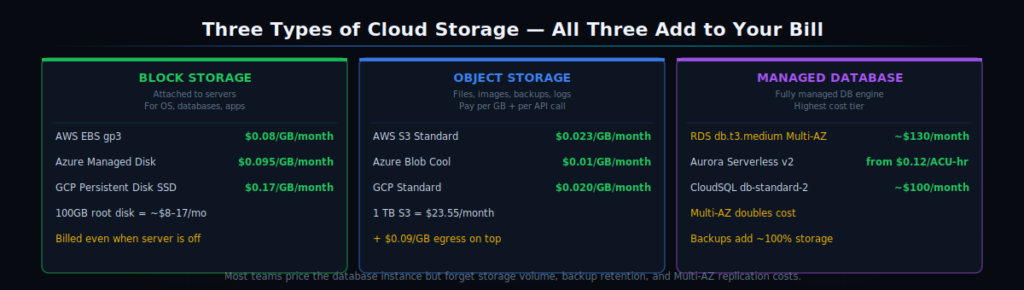
Three types of cloud storage — block (attached to servers), object (files and data), and managed database — each billed differently. Missing any one gives you an incomplete estimate.
💾 The Three Storage Types You Must Price
- Block storage (AWS EBS, Azure Managed Disks, GCP Persistent Disk) — attached directly to your servers. Priced per GB per month. AWS gp3 = ~$0.08/GB/month. A 100GB root disk = $8/month per server.
- Object storage (AWS S3, Azure Blob, GCP Cloud Storage) — for files, images, backups, logs. Priced per GB stored + per 1,000 API calls. AWS S3 Standard = ~$0.023/GB/month. 1TB = $23.55/month.
- Managed databases (AWS RDS, Azure SQL, GCP Cloud SQL) — the most expensive storage tier. A db.t3.medium RDS instance = ~$60–80/month including compute and storage. Don’t forget Multi-AZ doubles the cost.
The mistake most teams make is pricing only the database instance and forgetting the storage volume attached to it.
A 500GB RDS instance at $0.115/GB/month adds $57.50 on top of the compute charge — and automated backups add another 100% of that if you keep the default 7-day retention.
Step 3 — Estimate Your Networking and Data Transfer Cost
This is the layer that surprises people most. Cloud providers charge you for data leaving their network — called egress. Traffic into the cloud is almost always free. Traffic going out is not.
⚠️ Data Transfer Costs You Must Include
- Internet egress — data sent from your cloud to users on the internet. AWS charges $0.09/GB for the first 10TB/month. 10TB/month = $920. This is often the biggest surprise on a bill.
- Cross-region transfer — moving data between AWS regions, Azure regions, or GCP regions. Typically $0.02–$0.09/GB. Avoid this where possible by keeping workloads in one region.
- NAT Gateway — if your private VPC resources go out through a NAT Gateway, AWS charges $0.045/GB processed on top of the NAT Gateway hourly fee ($0.045/hr). Easy to forget, significant at scale.
- Load balancer processing — Application Load Balancers charge per LCU (Load Balancer Capacity Unit) processed. High-traffic APIs can add $50–300/month in LB costs alone.
Step 4 — Add Managed Services and Hidden Fees
Modern cloud architectures rarely use just raw compute and storage. You use managed queues, caches, container orchestration, monitoring, and logging services too. Each adds to your bill — and most are priced on usage, not flat rates.
| Service | What It Is | Typical Monthly Cost |
|---|---|---|
| AWS EKS / Azure AKS | Managed Kubernetes | $72–$146/cluster + node costs |
| AWS CloudWatch | Monitoring + logs | $0.50/GB logs ingested |
| AWS SQS / SNS | Queuing and messaging | $0.40 per million requests |
| AWS ElastiCache | Managed Redis / Memcached | $30–$150/month (cache.t3.medium) |
| AWS Secrets Manager | Secrets storage | $0.40/secret/month + $0.05/10k API calls |
| AWS Support (Business) | Technical support plan | 10% of monthly bill (min $100) |
Support plans deserve special attention. AWS Business Support charges 10% of your monthly bill. On a $10,000/month bill, that is an extra $1,000 per month that never appears in a bottom-up estimate. Always add it explicitly.
🧮 Ready to add up your numbers?
The Arkanops Cloud Cost Estimator handles all four layers — compute, storage, networking, and managed services — and shows your total in seconds.
Estimating GPU and AI Workload Costs
If your infrastructure includes any AI or machine learning workloads — model training, LLM inference, vector databases, or embedding generation — you need to estimate GPU costs separately.
In 2026, GPU costs and data-intensive AI pipelines push cloud bills into new territory. A single GPU instance left running unnecessarily can cost more in a week than a standard server costs in a month.
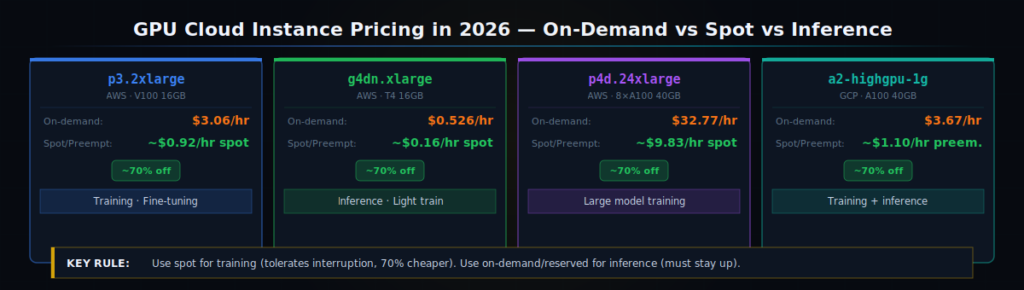
GPU instance pricing on major cloud providers in 2026. Spot/preemptible pricing cuts training costs by 60–80% — use it for any workload that can tolerate interruption.
| GPU Instance | GPU Type | On-Demand / hr | Spot / Preemptible | Best For |
|---|---|---|---|---|
| p3.2xlarge (AWS) | NVIDIA V100 (16GB) | $3.06/hr | ~$0.92/hr | Model training, fine-tuning |
| p4d.24xlarge (AWS) | 8× A100 (40GB) | $32.77/hr | ~$9.83/hr | Large model training |
| g4dn.xlarge (AWS) | NVIDIA T4 (16GB) | $0.526/hr | ~$0.16/hr | Inference, lighter training |
| a2-highgpu-1g (GCP) | NVIDIA A100 (40GB) | $3.67/hr | ~$1.10/hr | Training, inference |
⚡ How to Estimate AI / GPU Costs
- Training jobs — estimate GPU-hours needed × on-demand rate. Use spot instances to cut by 60–80%. Example: 10 hours on p3.2xlarge spot = 10 × $0.92 = $9.20 per training run.
- Inference endpoints — use the cheapest GPU that meets your latency target. A g4dn.xlarge serving a small model at $0.526/hr = $384/month if always on. Scale to zero to avoid paying for idle capacity.
- Token-based APIs (OpenAI, Anthropic, Bedrock) — price per 1M tokens. GPT-4o input = ~$5/1M tokens. At 10M tokens/day that is $50/day = $1,500/month — model selection matters enormously.
- Vector databases (Pinecone, Weaviate, Qdrant Cloud) — priced per index size and query volume. 1M 1536-dim vectors ≈ $70–100/month depending on provider and tier.
If you are building anything with AI, read our guide on Kubernetes and Docker for AI infrastructure — it covers how to right-size GPU nodes and cut inference costs with Karpenter and MIG partitioning.
A Real Example: Estimating a Mid-Size SaaS Product
Let us put the framework together with a real-world scenario. A SaaS startup wants to estimate monthly costs for a web application with: 3 web servers, 1 managed database, 1 Redis cache, 1TB of object storage, and 5TB/month of internet egress.
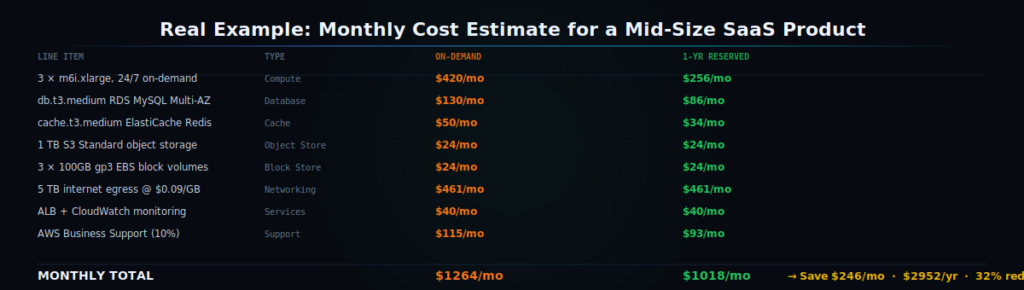
A real SaaS estimation: on-demand total = $1,127/month. Switching to 1-year Reserved Instances on compute and RDS drops it to $764/month — a 32% saving with zero architecture changes.
📊 SaaS Starter Stack — Monthly Cost Breakdown
- Compute: 3 × m6i.xlarge on-demand (24/7) = $0.192 × 730 × 3 = $420/month
- Database: db.t3.medium RDS MySQL (Multi-AZ) = $130/month
- Cache: cache.t3.medium ElastiCache Redis = $50/month
- Object Storage: 1TB S3 Standard = $23/month
- Block Storage: 3 × 100GB gp3 EBS = $24/month
- Internet Egress: 5TB/month × $0.09/GB = $461/month
- ALB + CloudWatch: estimated = $40/month
- AWS Business Support (10%): = $115/month
On-demand total: ~$1,263/month · $15,156/year
With 1-yr Reserved on compute + RDS: ~$856/month · $10,272/year
→ Annual saving: $4,884 with zero architecture changes
Notice that egress is by far the largest single line item at $461/month — more than compute.
This is exactly the kind of insight that a careful estimation process reveals before you commit to an architecture.
If this team chose a CDN (like CloudFront at $0.0085/GB) instead of direct S3 egress, they would cut that $461 to approximately $43 — saving $418/month.
Understanding Cloud Pricing Models
Every cloud provider offers the same workload at multiple price points depending on how much you commit. Picking the right model for each workload is one of the highest-leverage cost decisions you can make.
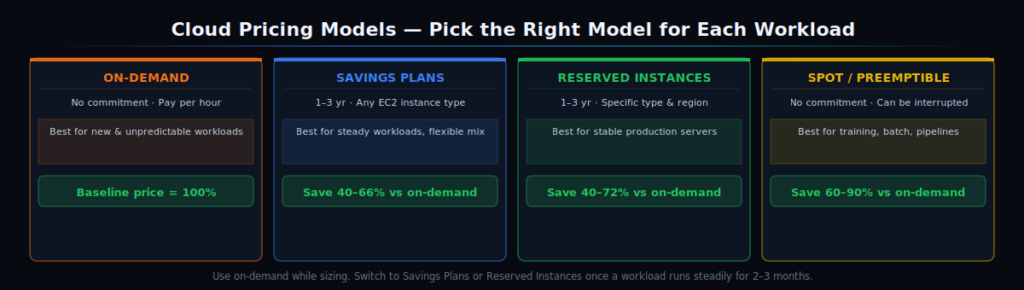
The four cloud pricing models — how much you commit determines how much you save. Spot instances offer the biggest discount but require workloads that tolerate interruption.
💡 Which Pricing Model Should You Use?
- On-demand — pay per hour, no commitment. Use for: unpredictable workloads, new services you haven’t sized yet, anything that might scale down in 3 months.
- Reserved Instances / Savings Plans (AWS) or Committed Use Discounts (GCP) — commit to 1 or 3 years, save 40–72%. Use for: production servers, databases, and any workload running more than 6 hours a day, every day.
- Spot Instances / Preemptible VMs — use spare cloud capacity at 60–90% discount. Use for: batch processing, ML training jobs, data pipelines — anything that can restart if interrupted.
- Savings Plans (AWS) — like Reserved Instances but more flexible. A Compute Savings Plan applies to any EC2 instance regardless of type or region. Good for teams where instance types change frequently.
67% of companies still struggle to accurately forecast their cloud costs, and traditional optimization efforts take six to nine months to fully implement — by which time hundreds of thousands of dollars in preventable overpayment have already accumulated. The earlier you build your estimate with the right pricing model, the less you overpay.
Estimating Costs Across Multiple Cloud Providers
If you run workloads on more than one cloud — or if you are deciding which cloud to use — you need to compare like-for-like. The same workload can cost meaningfully different amounts on AWS, Azure, and GCP, depending on instance family, region, and discount structure.
Key things to know when comparing across providers:
🌐 Multi-Cloud Cost Comparison Checklist
- Normalise instance types — an AWS m6i.xlarge (4 vCPU/16GB) is roughly equivalent to Azure Standard_D4s_v5 and GCP n2-standard-4. Compare apples to apples.
- Check egress costs per region — egress pricing varies by region and destination. AWS us-east-1 to internet = $0.09/GB. AWS ap-southeast-1 (Singapore) = $0.12/GB. Region selection affects your networking cost.
- Factor in discount mechanisms differently — AWS has Reserved Instances AND Savings Plans. GCP has Committed Use Discounts AND Sustained Use Discounts (automatic). Azure has Reservations AND Azure Hybrid Benefit. Each works differently.
- Include the support tier — AWS Business Support is 10% of spend. Azure Unified Support starts at $1,000/month. GCP Premium Support is 9% of spend. These are real costs.
- Use the FOCUS specification — this open standard normalises billing data across all clouds so you can compare them in one report. See our FinOps Guide for how to implement it.
5 Mistakes That Make Your Estimate Wrong
Even with a solid framework, estimates go wrong in predictable ways. Avoid these five and your estimate will be dramatically more accurate.
🚨 The 5 Most Common Estimation Mistakes
- Forgetting egress costs. Data transfer out to the internet is often the biggest surprise on a bill. Always estimate your monthly data transfer volume and price it explicitly.
- Using one region for pricing, deploying in another. AWS us-east-1 is typically the cheapest region. EU and Asia-Pacific regions cost 10–25% more. Price in the region you will actually use.
- Not accounting for Multi-AZ / replication costs. Multi-AZ RDS doubles the instance cost. A replicated storage volume doubles the storage cost. High availability has a price tag.
- Estimating peak capacity, not average. Most workloads run at 20–40% of peak traffic most of the time. In most production environments, average compute utilization falls below 40%. Autoscaling means you should estimate average utilisation, not peak.
- Ignoring backup and snapshot costs. RDS automated backups, EC2 snapshots, and cross-region backup replication all add to your storage bill silently. Add 10–15% buffer for backup storage.
Don’t Forget Security Infrastructure Costs
Security tooling carries real cloud cost. WAF rules, secrets managers, VPN endpoints, security scanning services, and compliance logging all add to your infrastructure bill.
Cloud setups frequently accumulate unused or idle resources that continue to generate costs — and security services are no exception.
If you are building a secure cloud setup, read our guide on DevSecOps and Security-as-Code in 2026 — it covers how to use policy-as-code to manage security costs alongside security posture, so your guardrails do not become runaway spend.
★ Key Takeaways
- Break your estimate into four layers. Compute, storage, networking, and managed services. Compute is only 40–50% of most cloud bills — the rest is what surprises teams.
- Always include egress costs. Data transfer out to the internet is $0.09/GB on AWS. At 5TB/month, that is $461/month — often bigger than the server cost itself.
- Use the right pricing model per workload. On-demand for flexible/new workloads. Reserved Instances for steady production servers (40–72% saving). Spot for training jobs and batch processing (60–90% saving).
- GPU costs need separate estimation. AI workloads can exceed compute costs. Use spot instances for training and scale-to-zero for inference to avoid paying for idle GPU capacity.
- Add a 15–20% buffer for hidden costs. Support plans (10% of bill on AWS), monitoring/logging, backup storage, and incidental services always add to the final number.
🧮 Get Your Cloud Cost Estimate Now
You have the framework. Now plug in your numbers. The Arkanops Cloud Cost Estimator covers all four layers and gives you an accurate monthly figure — free, no signup needed.
Frequently Asked Questions
How do you estimate cloud infrastructure costs?
Break your infrastructure into four layers: compute, storage, networking, and managed services. Price each one at the correct rate for your pricing model (on-demand, reserved, or spot).
Add 15–20% for hidden costs like support, monitoring, and backup storage. Use the Arkanops Cloud Cost Estimator to automate this process and get a result in seconds.
What are the biggest hidden cloud costs?
The biggest hidden costs are data egress fees (AWS charges $0.09/GB to the internet), support plans (10% of your monthly bill on AWS Business), idle resources left running after projects end, Multi-AZ replication doubling your database cost, and backup storage accumulating silently. Always price these explicitly in your estimate.
How much does cloud infrastructure cost per month?
A small startup typically pays $500–$2,000/month. A mid-size SaaS product with 3 web servers, a managed database, caching, and 5TB of monthly egress runs approximately $850–$1,300/month depending on the pricing model.
Large enterprises can spend millions monthly. Use the Cloud Cost Estimator to get an accurate number for your specific setup.
What is the difference between on-demand and reserved instance pricing?
On-demand charges per hour with no commitment — maximum flexibility, highest price. Reserved Instances or Savings Plans require a 1 or 3-year commitment in exchange for 40–72% lower rates.
Use on-demand for new or unpredictable workloads. Switch to reservations once a workload has been running steadily for 2–3 months and you are confident in its size.
How do I estimate Kubernetes and container costs?
Price the underlying node instances (EC2, VMs) plus the managed control plane fee ($72–$146/cluster on EKS/AKS). Use OpenCost — a free, open-source CNCF tool — to allocate costs per namespace and workload.
Read our guide on Kubernetes and AI infrastructure for GPU cost management in containerised environments.
Facing similar challenges?
Our team of architects can help you implement these patterns in your organization.
Schedule a Free Architecture ReviewRelated Articles
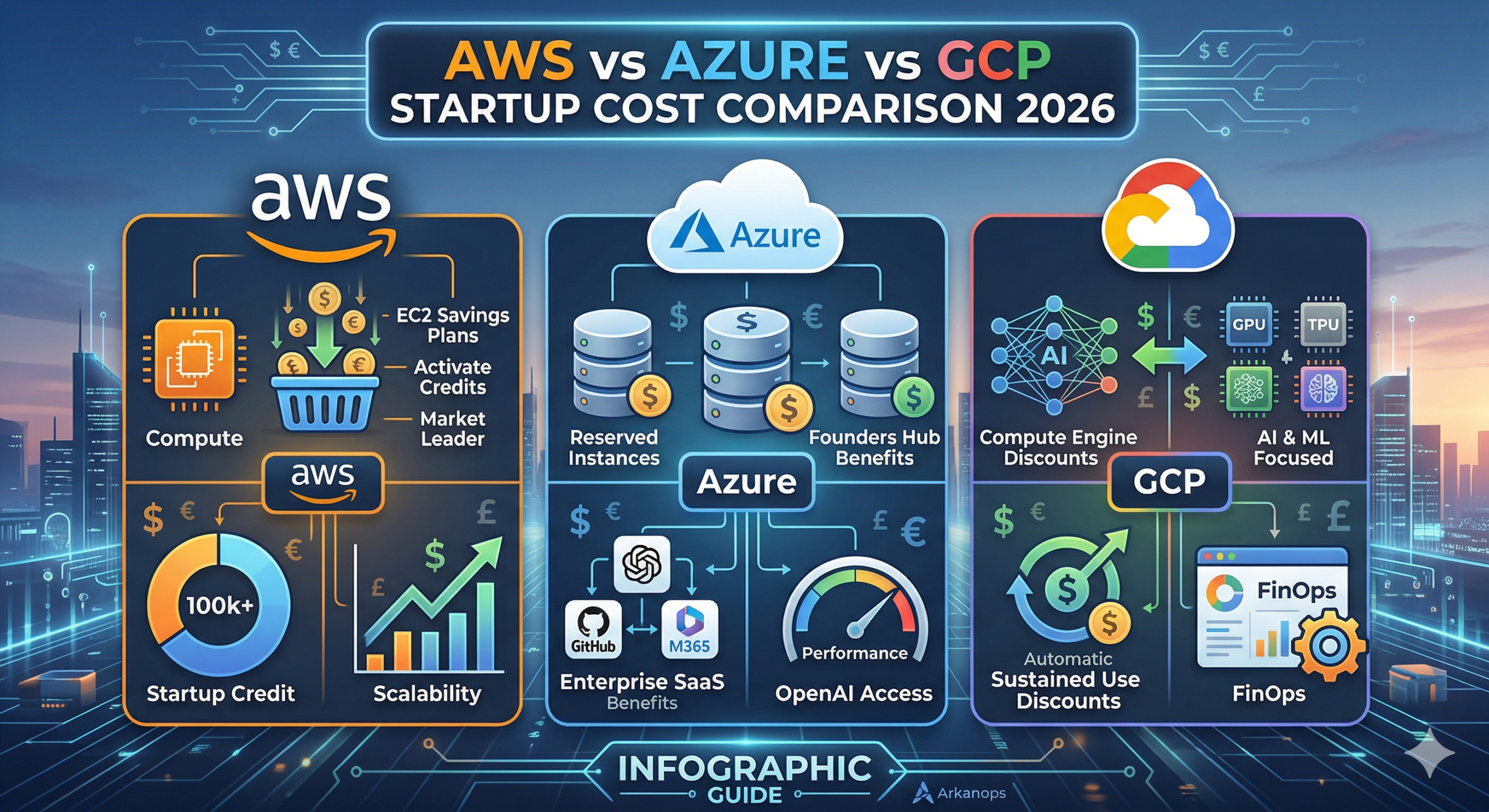
AWS vs Azure vs GCP: The Ultimate 2026 Startup Cost Comparison
For a tech startup in 2026, the cloud is no longer just “infrastructure.” It is the engine of your innovation. However, that engine can quickly consume your entire seed round if you don’t manage it properly. Amazon Web Services (AWS), Microsoft Azure, and Google Cloud Platform (GCP) have shifted their strategies this year. They are […]
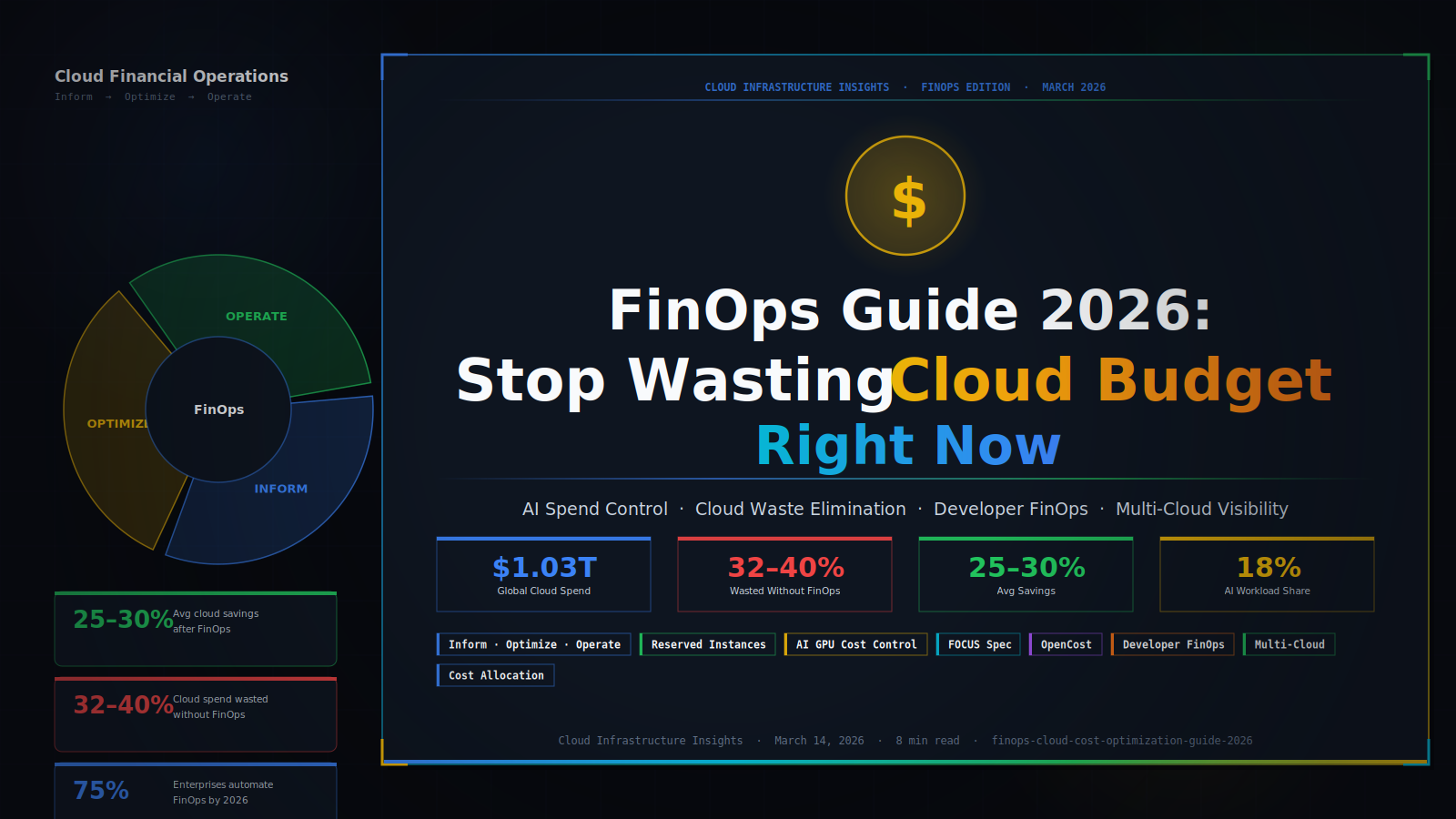
FinOps Guide 2026: Stop Wasting Cloud Budget Right Now
Your cloud bill grows every month. Your team ships faster. But do you actually know where the money goes? Most companies waste nearly a third of their cloud spend without realizing it. FinOps fixes that — and in 2026, it has become a board-level priority. Here is everything you need to know. FinOps 2026 — […]