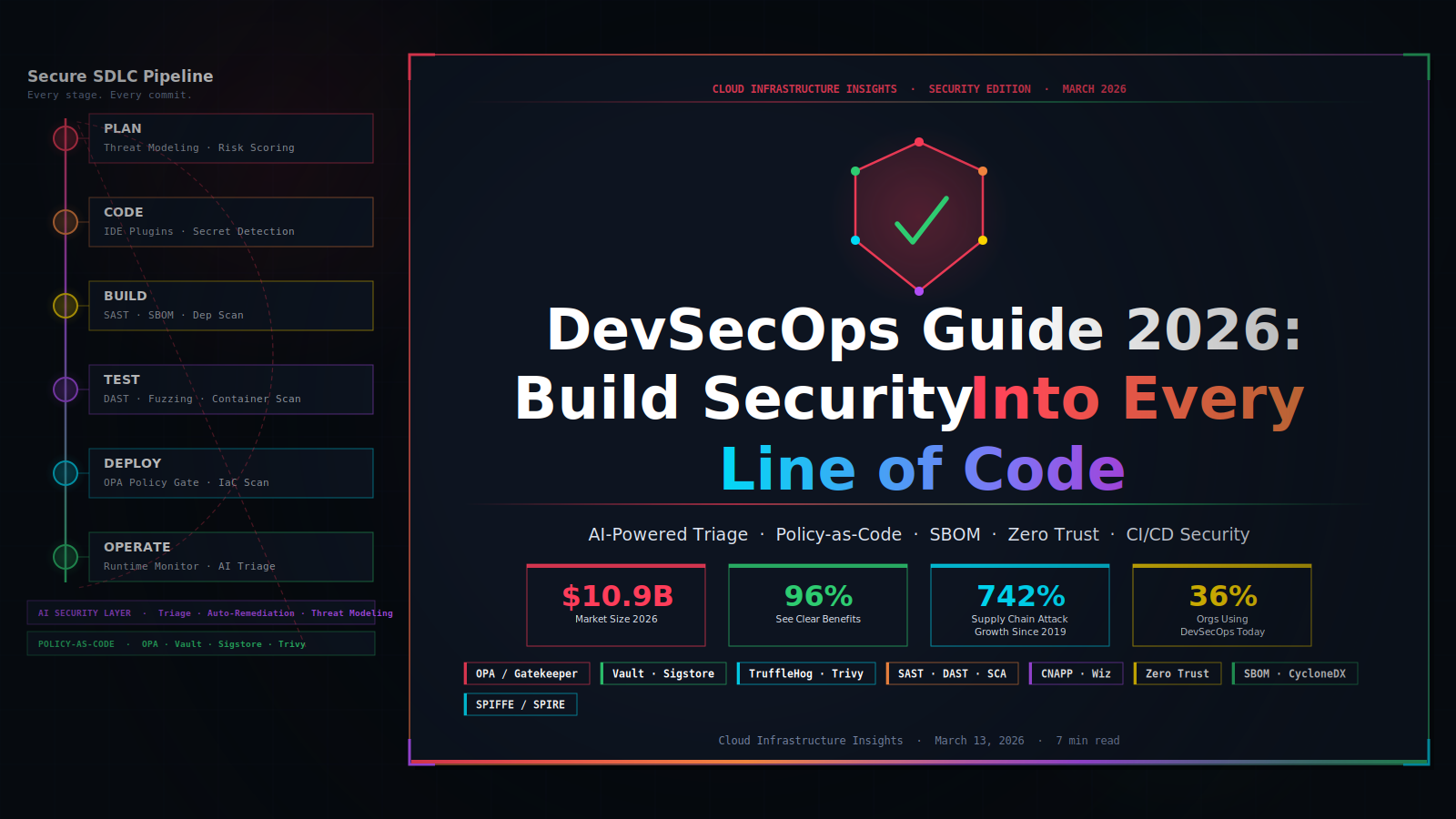
DevSecOps in 2026:Security That Ships With Your Code
Most teams still bolt security onto the end of their pipeline. They run a scan before release, get 800 findings with no context, and ship anyway. There is a better way — and the teams using it ship faster and more securely. Here is exactly how they do it. Picture this, Your team is three days from […]
Most teams still bolt security onto the end of their pipeline. They run a scan before release, get 800 findings with no context, and ship anyway. There is a better way — and the teams using it ship faster and more securely. Here is exactly how they do it.
Picture this, Your team is three days from a release. The security scanner just dumped 847 vulnerabilities into a ticket with zero context. Do you fix them all and miss the deadline? Or do you ship and hope for the best?
Most teams ship. And that is exactly the problem DevSecOps exists to fix.
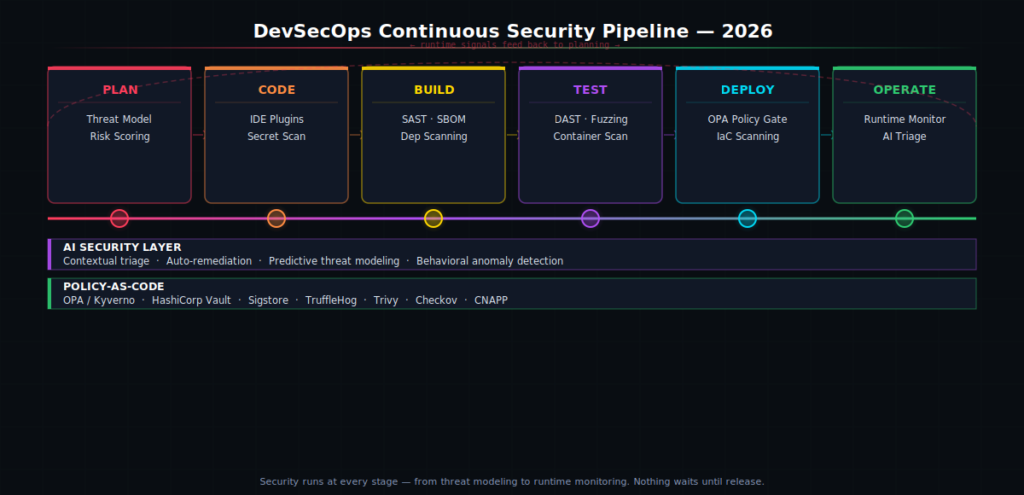
DevSecOps stands for Development, Security, and Operations working together. Instead of running security checks at the end, you embed them at every stage — from the first line of code all the way to production. Application security in 2026 is a constant workflow that starts at the moment code is written and stays active through production. No surprises. No 11th-hour scrambles.
In this guide, you will learn what DevSecOps really means in 2026, how Security-as-Code changes the way your team works, which tools actually matter, and how to get started without slowing your team down.
What Is DevSecOps? (And Why It Matters Right Now)
DevSecOps means security is everyone’s job — not just the security team’s job. Developers write secure code. Operations run a secure infrastructure. Security engineers build tools and policies that fit into the existing workflow. No handoffs. No last-minute gates. Just secure software, built continuously.
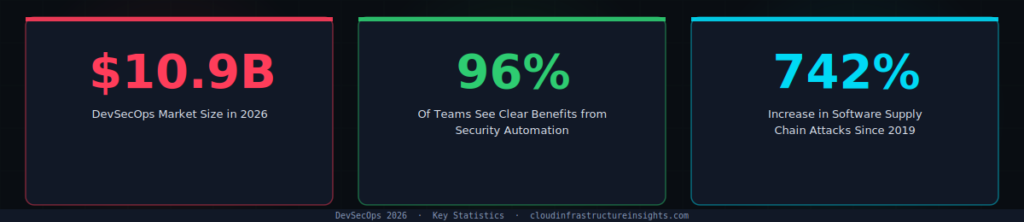
Here is why it matters right now. The DevSecOps market in 2026 is valued between $8.58 billion and $10.88 billion, driven by cloud-native shifts, regulatory pressure, and AI integration.
Organizations are not just adopting DevSecOps because it is good practice. They are adopting it because they are expected to ship quickly, adopt AI-assisted development, and operate across cloud-native environments while staying aware of growing supply chain and application vulnerabilities.
Teams with higher delivery performance don’t just ship code faster — they also recover from security failures more quickly. Speed and security are not opposites. They are outcomes of the same good practices.
The old model treated security as a gate. You wrote code, then handed it to a security team, then waited. That model breaks down at modern development speed. Only 36% of organizations now develop software using DevSecOps — which means 64% are still doing it the slow, risky way. That gap is where breaches happen.
Stop Shifting Left. Start Shifting Smart.
You have heard “shift left” — move security earlier in the pipeline. Good idea. But it created a new problem. Teams started getting flooded with alerts. One engineer described getting 847 vulnerabilities dumped with zero context. When every finding looks equally urgent, nothing gets fixed.
The smarter approach is not about moving security left. It is about making security intelligent, contextual, and actionable. Shift-smart means stopping the flood of low-impact alerts. Security feedback must be intelligent, contextual, and actionable directly in the developer’s workspace.
In practice, shift-smart means three things:
✅ What Shift-Smart Looks Like in 2026
- Warn in dev, require approval in staging, block in production. Every environment has the right level of enforcement — not a one-size-fits-all block.
- Runtime signals loop back to planning. A vulnerability found in production updates the threat model for the next sprint automatically.
- Evidence is automatic and change-linked. Every security decision is tied to a commit, a PR, and a person — no manual audit trails.
This is the difference between a DevSecOps tool stack and a DevSecOps culture. Tools are easy to buy. Culture — where developers actually care about security because it helps them ship better code — takes deliberate work to build.
What Is Security-as-Code?
Security-as-Code is exactly what it sounds like. You write your security rules as code files. Those files live in Git. They get reviewed in pull requests, tested in CI, and enforced automatically at every deploy.
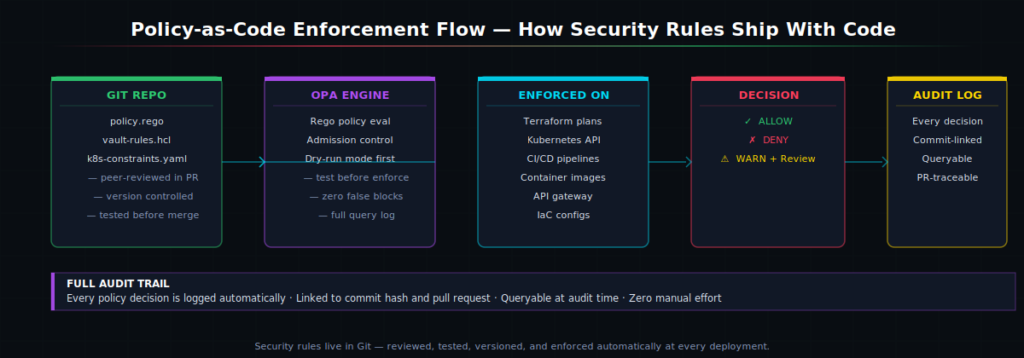
Think about how Infrastructure-as-Code changed the way teams manage servers. Instead of clicking through a cloud console, you write a Terraform file. Anyone can review it. Anyone can reproduce it. Security-as-Code does the same thing for your security policies.
Here is the core toolchain every mature DevSecOps team uses in 2026:
🔧 The 2026 Security-as-Code Toolchain
- Open Policy Agent (OPA) / Kyverno — write and enforce policy rules across Kubernetes and CI/CD
- HashiCorp Vault — manage secrets and issue short-lived credentials automatically
- Sigstore / Cosign — cryptographically sign every container image and artifact
- TruffleHog — scan commit history for leaked secrets and credentials
- Trivy / Checkov — catch misconfigurations in IaC files before they hit production
- CNAPP platforms (Wiz, Prisma Cloud, Defender for Cloud) — unified view across cloud security posture, workload protection, and IaC scanning
How AI Is Changing DevSecOps in 2026
AI does not replace your security team. But it does change what your security team spends time on. Instead of manually triaging 800 scanner alerts, they focus on the five that actually matter.
Vibe coding with AI agents is a powerful tool for quick development but should not be implicitly trusted to write secure code. This is one of the biggest new risks in 2026. CI/CD pipelines now flag misconfigurations, dependency drift, and AI-generated changes early, giving teams the clarity needed to ship stable releases without slowing delivery.
🤖 Where AI Adds Real Value in DevSecOps
- Smart alert triage — ranks vulnerabilities by real exploitability, not just CVSS score
- Predictive threat modeling — finds likely attack vectors before code is written
- IDE security hints — flags insecure patterns as you type, not after you push
- AI-generated code review — checks AI-assisted code with the same rigor as human-written code
- Behavioral anomaly detection — catches runtime deviations that signature-based tools miss
The key insight here is that AI-generated code needs the same security scrutiny as a third-party library. You would not import an untrusted npm package without reviewing it. Do not merge AI-generated code without the same rigor.
Software Supply Chain Security: Why SBOMs Are Now Non-Negotiable
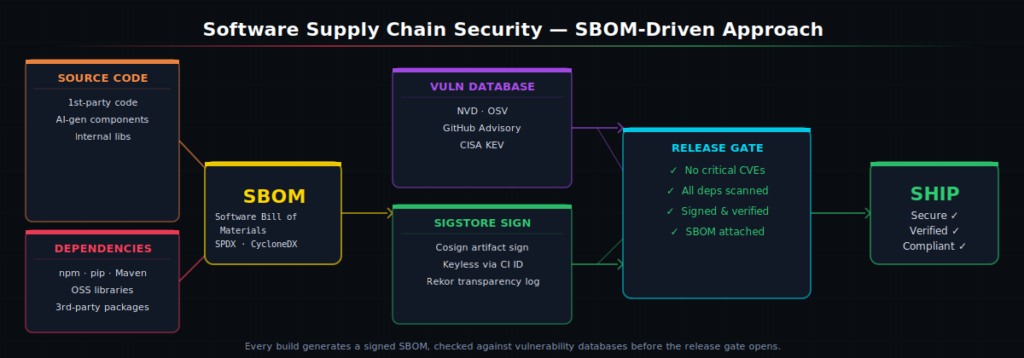
Software supply chain attacks increased 742% between 2019 and 2022. Attacks like SolarWinds, Log4Shell, and XZ Utils showed that your code is only as secure as every library it depends on. In 2026, a Software Bill of Materials (SBOM) is the tool that gives you visibility into that dependency chain.
Every build should generate an SBOM — a machine-readable list of every component in your software. Cross-reference it against the NVD and OSV vulnerability databases.
Block the release if anything critical comes back unfixed. Then sign the artifact with Sigstore so you have cryptographic proof of where every binary came from. That chain of custody is what regulators and enterprise buyers increasingly demand.
⚡ Quick-Start: SBOM in Your Pipeline Today
- Generate SBOM with Syft or CycloneDX CLI — runs in under 30 seconds per build
- Scan with Grype or OSV-Scanner — free, open source, integrates with any CI/CD
- Sign with Cosign (part of Sigstore) — keyless signing tied to your CI identity
- Gate on
CRITICALseverity or higher — do not block on informational findings
Zero Trust in DevSecOps: What It Actually Means
You have probably seen “Zero Trust” on every vendor’s website. Let us cut through the noise.
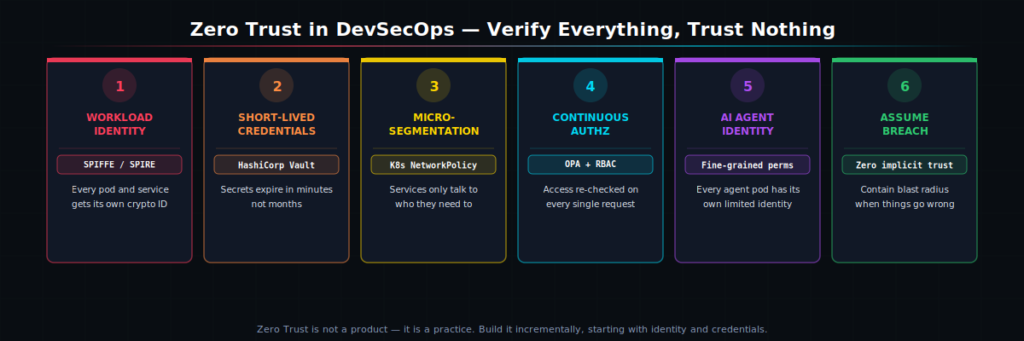
Zero Trust means one thing: verify everything, trust nothing, assume you are already breached. Every request — from a developer’s laptop, a CI runner, a container, an AI agent — must prove its identity before it gets access to anything. No free passes for being inside the network perimeter.
🔐 Zero Trust Checklist for DevSecOps Teams
- Workload identity — use SPIFFE/SPIRE to give every pod and service its own cryptographic identity
- Short-lived credentials — Vault issues credentials that expire in minutes, not months
- Micro-segmentation — Kubernetes NetworkPolicy restricts which services can talk to each other
- Agent identity — every AI agent pod needs its own identity with fine-grained permissions
- Continuous authorization — access is re-checked on every request, not just at login
In 2026, cloud-native architectures have transformed security by introducing microservices, APIs, and resources that expand the attack surface and scale risks across distributed environments. The rise of AI agents adds another layer of complexity, as autonomous tools now interact with systems, trigger actions, and potentially introduce risk without human oversight. Zero Trust is how you contain the blast radius when — not if — something gets compromised.
How to Get Started With DevSecOps Today
You do not need to overhaul everything at once. The teams that succeed start small, prove value fast, and expand from there. Here is a proven three-step starting point.
Step 1 — Measure before you add gates
You need a baseline before you can improve. Start tracking three numbers: mean time to remediation (MTTR), critical vulnerability density, and what percentage of builds fail security checks. These tell you where the real problems are. Organizations measure DevSecOps success through business and security outcomes like mean time to remediation, cross-team collaboration, reduction in critical vulnerabilities, and overall operational efficiency.
Step 2 — Start with three must-block policies
Do not try to encode every rule on day one. Pick the three controls that matter most: no public S3 buckets, no containers running as root, no unscanned images in production. Write those as OPA or Kyverno policies. Test them in dry-run mode for two weeks. Then enforce them. Build the habit before you expand the scope.
Step 3 — Treat AI-generated code like a third-party dependency
GitHub Actions workflows routinely handle production credentials, generate release builds, and execute third-party code in highly privileged contexts, yet most organizations don’t secure them with the same rigor they apply to production infrastructure. The same applies to AI-generated code. Flag it for review. Log it in your release record. Run SAST on it. It is code — treat it like code.
★ Key Takeaways
- DevSecOps embeds security at every stage. Security runs from the first commit to production — not just before release. Teams that do this ship faster and with fewer incidents.
- Security-as-Code puts policies in Git. Use OPA, Vault, and Sigstore. Policies get reviewed in PRs, tested dry-run, and enforced automatically. Full audit trail included.
- Shift smart, not just left. Warn in dev, require approval in staging, block in production. Make security feedback contextual so developers act on it instead of ignoring it.
- SBOMs are baseline in 2026. Every build generates a signed, verified Software Bill of Materials. No SBOM, no ship — especially for enterprise and government customers.
- AI code needs AI security review. Over 70% of enterprise codebases include AI-generated components. Treat AI-generated code with the same scrutiny as any third-party library.
Frequently Asked Questions
What is the difference between DevOps and DevSecOps?
DevOps focuses on speed and collaboration between development and operations. DevSecOps adds security as a third pillar — embedding security checks, policies, and testing into every stage of the DevOps pipeline instead of treating security as a separate downstream step.
What tools do I need to start with DevSecOps?
Start simple: add secret scanning (TruffleHog), dependency scanning (Trivy or Grype), and IaC scanning (Checkov) to your CI pipeline. Then add policy-as-code with OPA or Kyverno. Finally add SBOM generation and signing with Syft and Cosign. Build the stack incrementally.
Does DevSecOps slow down development?
Done right, it actually speeds things up. Finding a vulnerability in a commit takes minutes to fix. Finding the same issue in production takes days. The short-term overhead of security checks is far less than the cost of a production incident or a delayed release caused by a last-minute security audit.
What is an SBOM and do I need one?
An SBOM (Software Bill of Materials) is a complete list of every component — every library, package, and dependency — in your software. In 2026, you need one. Enterprise buyers and government customers increasingly require it. US Executive Order 14028 mandates it for federal software vendors. Generating an SBOM is free with tools like Syft and takes seconds per build.
Facing similar challenges?
Our team of architects can help you implement these patterns in your organization.
Schedule a Free Architecture ReviewRelated Articles
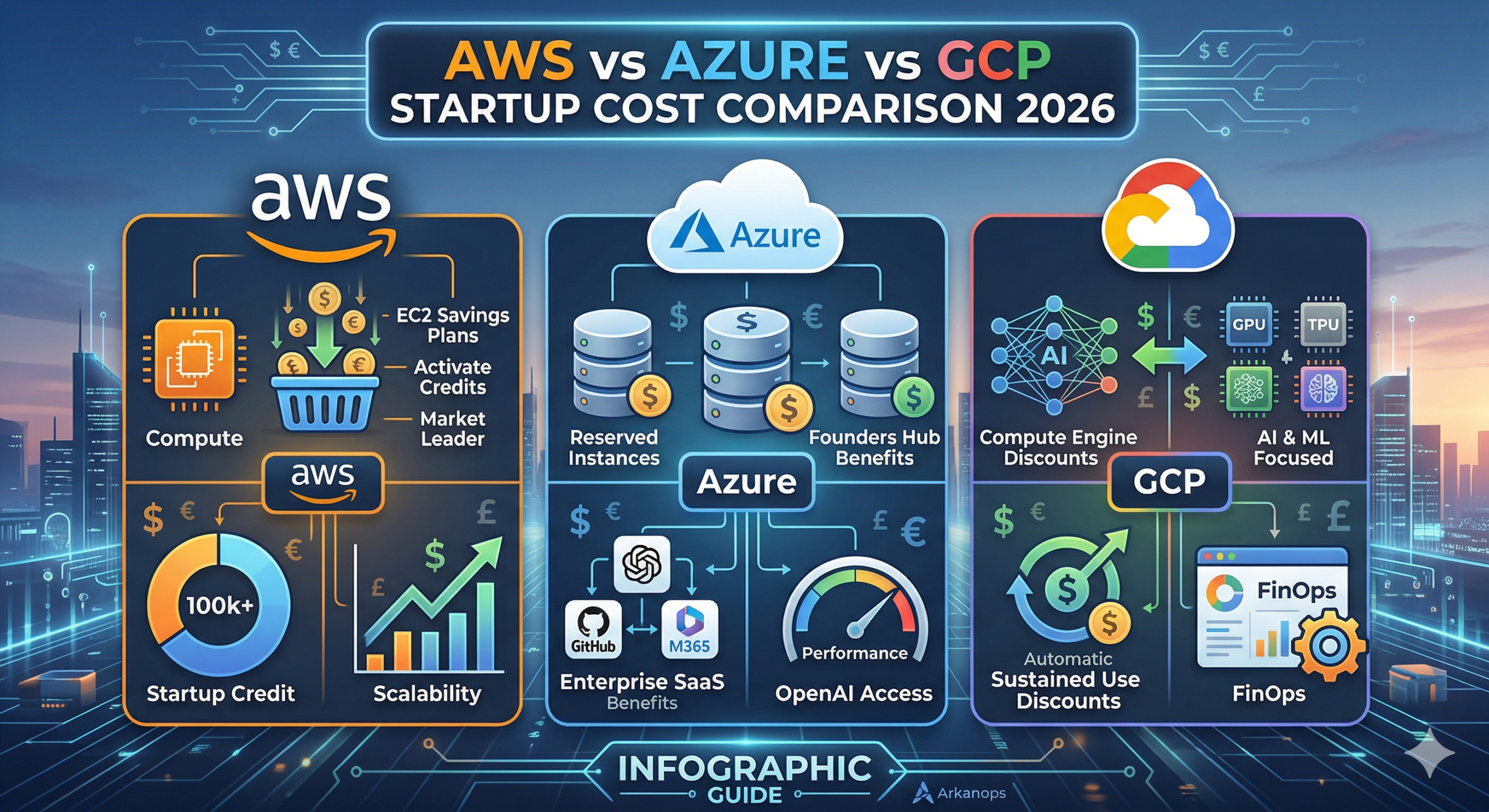
AWS vs Azure vs GCP: The Ultimate 2026 Startup Cost Comparison
For a tech startup in 2026, the cloud is no longer just “infrastructure.” It is the engine of your innovation. However, that engine can quickly consume your entire seed round if you don’t manage it properly. Amazon Web Services (AWS), Microsoft Azure, and Google Cloud Platform (GCP) have shifted their strategies this year. They are […]
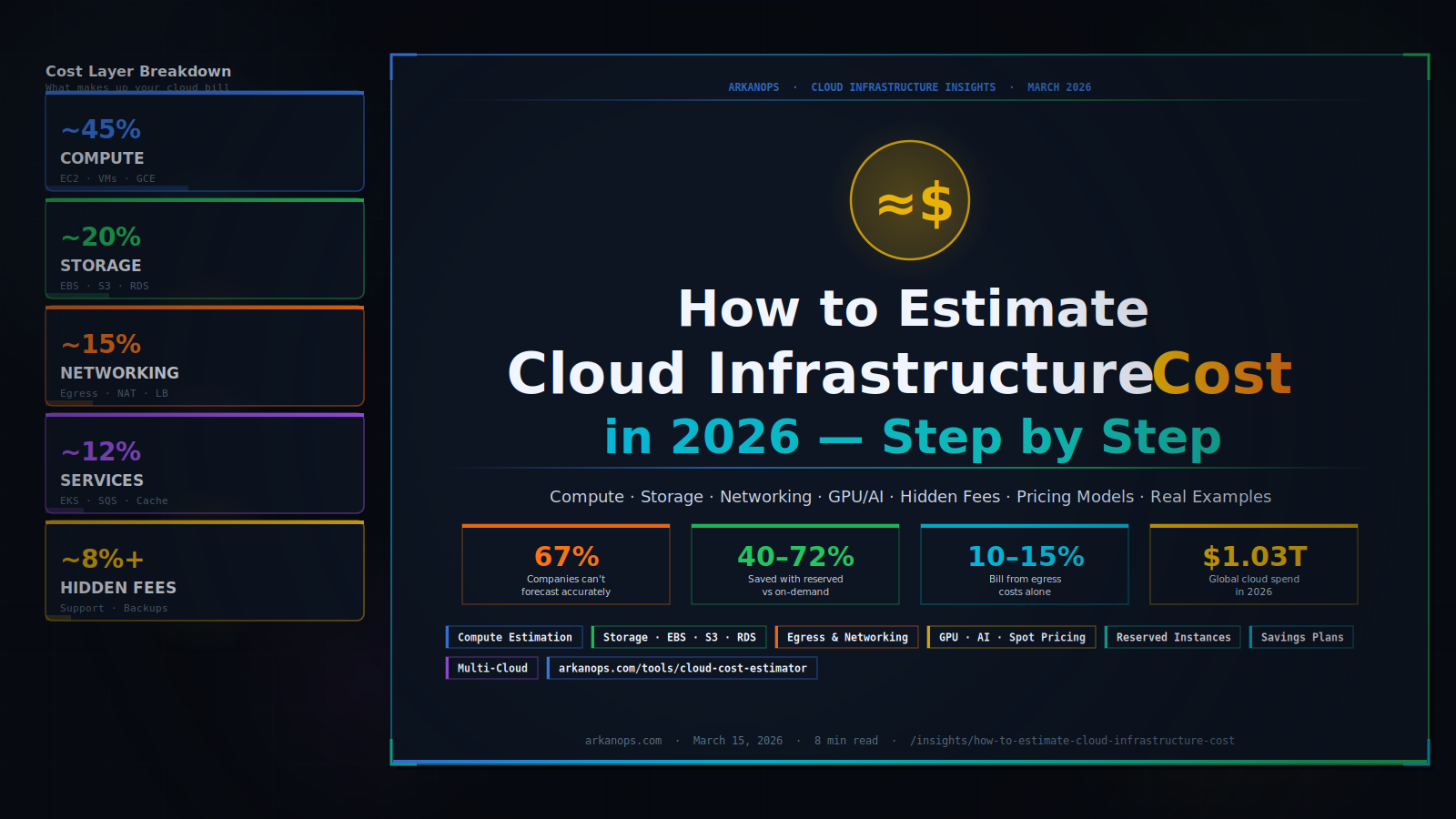
How to Estimate Cloud Infrastructure Cost in 2026
You are about to build something in the cloud — or you are already running something, and the bill keeps surprising you. Either way, you need a number you can trust. This guide shows you exactly how to estimate cloud infrastructure costs, layer by layer, without guesswork. Cloud infrastructure cost breaks into four main layers […]